前言:#
檔案上傳是非常常見的需求邏輯,如果是很基礎的將檔案存放在系統資料夾內,那麼問題不大
問題在於,基於無狀態的系統運作架構如K8s,我們都會希望將檔案另外儲存起來,如GCS
這時候就會遇上,當資料變更時該如何好好的同步來處理這個檔案
下面將著重在後端對於檔案的處理方式
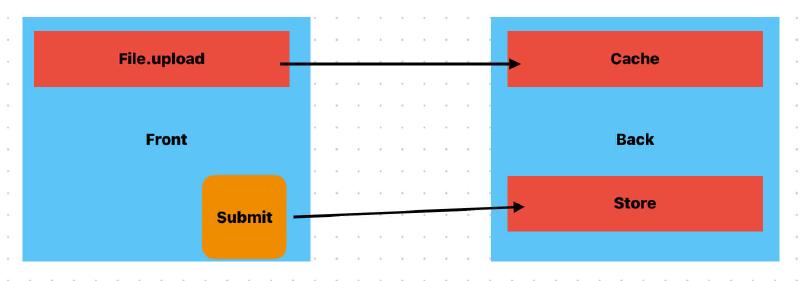
資料處理流程大致如下
前端#
在Nuxt的結構下我們已經設計好一個名為File 的Component
<File ref="file_upload" :multiple="true" :files="submit_data.files"></File>並且在ㄓFile這個Component中,設計好一個method名為upload如下,用於將檔案往後端URL送出
        async upload(){
            let upload_url = process.env.MIX_API_URL+'/api/file_upload'
            let error_message = ''
            let upload_results = []

            try {
                for (let index in this.storedFiles) {
                    let formData = new FormData()
                    formData.append('file', this.storedFiles[index])
                    let upload_result = await axios({
                        method: 'post',
                        url: upload_url,
                        data: formData
                    })
                    if(typeof upload_result.data !== 'undefined'){
                        upload_results.push(upload_result.data.data)
                    }
                }
            }catch (err) {
                error_message = err;
                if (err?.response?.data) {
                    error_message = err.response.data.message;
                }
                throw TypeError(error_message)
            }

            if(error_message !== ''){
                upload_results = false
                this.$swal({
                    title: '檔案上傳錯誤',
                    html: error_message,
                    icon: 'warning',
                    confirmButtonText: '我知道了',
                    showCancelButton: false
                })
                throw TypeError(error_message)
            }

            return upload_results
        }
內容很簡單,就是透過axios將檔案post到後端,如果有錯誤訊息就提示,沒有的話將後端回傳的結果return
upload method被呼叫的時間點會在前端將資料送出的前一刻,透過refs來將檔案送出
let create_files = await this.$refs.file_upload.upload()最後,將create_files連同表單其他資料再送往後端做資料儲存即可
後端#
後端的邏輯是今天的重點,我們拆成幾個步驟來看
- 當前端的File送出檔案後,我們將檔案cache起來,並且還給前端一把key
- 當前端表單所有資料送出後,我們使用key將cache起來的檔案讀出,並且送至GCS中實際儲存
因此,我們設計了三個Service來處理事情
首先,因為如果在後端Controller中寫死哪幾個column需要做檔案處理那麼彈性就太過不足,因此我們在Model中描述了$file_columns,借此透過抽象邏輯來處理每張資料表要儲存的檔案欄位
FileColumnProcessService作為入口,負責處理CRUD四個動作時檔案的欄位值提取,以及處理動作
FileHandleService實際處理檔案從cache中取出、還原、上傳到GCS等等操作
ImageProcessService作為檔案處理的一環,對於圖片的所有處理,包含壓縮、變更長寬,以及iOS的heic檔案處理等等
實際檔案的儲存還是透過跟這篇相同的套件直接傳入GCS中 https://www.alvinchen.club/2019/08/28/laravel-%e4%b8%8a%e5%82%b3%e6%aa%94%e6%a1%88%e5%88%b0google-cloud-plateform-storage-gcs/
Service#
接著我們以create來舉例檔案處理的步驟
class FileColumnProcessService
{
    public function create(array $payload, String $model): array
    {
        $all_file_columns = $this->_get_file_columns($model);
        return $this->_process_create(structure: $all_file_columns,payload: $payload);
    }
}
其中,_get_file_columns會透過 RelectionClass取出指定的model中定義的file_columns,這樣就會之到前端送來的資料中有哪幾個column是需要處理的
_process_create中會呼叫FileHandleService實際處理每一個需要將檔案正確擺放到GCS上的邏輯
接著讓我們來看FileHandleService中定義的幾個重要method
class FileHandleService
{
    public function cache(UploadedFile $file): string
    {
        $key = Str::uuid()->toString();
        $org_name = $file->getClientOriginalName();
        if(Cache::has('file_name_cache_'.$org_name)){
            $key = Cache::get('file_name_cache_'.$org_name);
        }else{
            Cache::set('file_name_cache_'.$org_name, $key, $this->file_cache_ttl);
            Cache::set($key, ['name'=>$org_name,'content'=>$file->get()], $this->file_cache_ttl);
        }
        return $key;
    }
    public function store(array|string $file_key): array
    {
        $result = [];
        $upload_files = $this->_make_files(key:$file_key);
        foreach($upload_files as $upload_file){
            $org_name = $upload_file->getClientOriginalName();
            $upload_file = $this->imageProcessService->make($upload_file);
            $stored_path = $upload_file->store(env('UPLOAD_DIR'));
            $size = Storage::size($stored_path);
            $info = pathinfo($stored_path);

            $result[] = [........];
        }
        return $result;
    }
}
cache用於對應前端File Component送出的請求,將檔案直接透過Laravel 的cacheh存下來
store用於對於前端表單資料的請求,實際上就是將檔案從cache中讀出,然後送到GCS上,最後依照需要儲存的檔案資料組成$result返回就行
過程中,讀出cache中的資訊,寫入temp file中轉換成UploadedFile,再藉由Larvel原生的store function將檔案儲存到GCS上 這邊就不多做描述,有興趣可以至github上查閱
Controller#
因此,在controller中,我們就能濃縮成這樣子來描述檔案欄位的處理
$this->file_column_process_service->create(payload:$payload,model:CUSTOMER_MODEL::class);payload 為前端傳入的所有資料,CUSTOMER_MODEL即是本次要寫入檔案資料的表單model