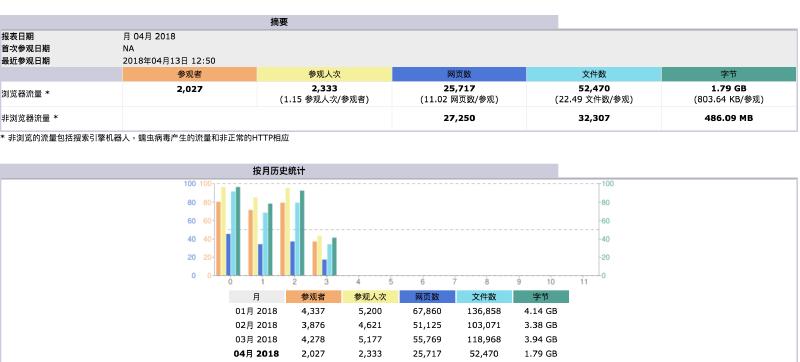
awstats 是一套流量計算軟體
參考網址 :https://blogging.dragon.org.uk/installing-awstats-on-ubuntu-16-04-lts/
參考網址3:http://koo.fi/blog/2012/12/01/awstats-multi-site-setup/
依照前起篇的教學如果網站架設好了,當然你會想要了解有多少人來你的網站看過,這時候Google Analytics是一個很好用的工具,只是GA無法知道整體的流量有多少,舉個例子好了,我想要知道使用者從我的伺服器下載多少流量的檔案,這時候GA就無法告訴你了,所以需要依賴第三方軟體Awstats
步驟一: 安裝Awstats#
sudo apt-get install awstats libgeo-ipfree-perl libnet-ip-perl步驟二: 設定Awstats#
把預設的config複製一份出來,為了以後識別方便因此將檔案名稱設定成domain name,nano打開編輯
sudo cp /etc/awstats/awstats.conf /etc/awstats/awstats.yourdomain.conf
sudo nano /etc/awstats/awstats.yourdomain.conf
接著注意幾個需要修改的地方
LogFormat=1

SiteDomain="yourdomain.com"
HostAliases="localhost 127.0.0.1 example.com"

LoadPlugin="tooltips"
LoadPlugin="graphgooglechartapi"
LoadPlugin="geoipfree"

SkipDNSLookupFor="REGEX[^192\.168\.]"

AllowFullYearView=3

LogFile="/var/log/apache2/access.log"
「LogFormat=」的部份,將預設的4修改為1,如:LogFormat=1 (如果後面執行的時候顯示格式有錯,可以改回4,但是可能有些東西會沒辦法分析)
「LogFile=」的部份,修改並加上加上你要讀的access log檔
「SiteDomain=」的部份,設定你網站的網址
其他應該是不需要異動
步驟三: 移除現有檔案紀錄#
由於awstats 是透過分析Apache的紀錄檔進而計算流量,並且會將紀錄寫入awstats 的記錄檔,因此在開始之前清除既有的紀錄檔,可以避免計算有誤
sudo mv /etc/cron.d/awstats /root
sudo rm /var/lib/awstats/*步驟四:手動執行一次#
基本上awstats 的設定已經完成,先手動跑一次看看有沒有錯誤的狀況
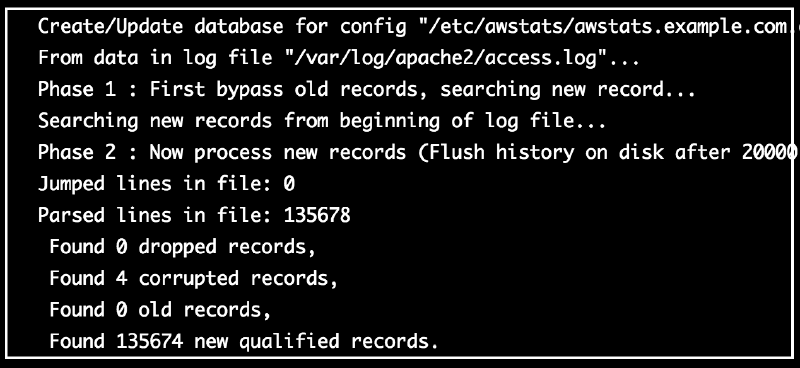
sudo /usr/lib/cgi-bin/awstats.pl -config=yourdomain.com -update基本上如果沒有錯誤的話應該會看到類似以下的畫面
步驟五:設定定期自動讀取檔案#
基本上不可能時常手動的執行上面的指令讓awstats 去分析檔案,因此我們必須要設定一個排程讓ubuntu自動去執行指令
sudo mv /root/awstats  /etc/cron.d
sudo nano /etc/cron.d/awstats
透過nano編輯cron.d底下的asstats檔案,裡面只需要加入一行,每10分鐘去執行一次指令
*/10 * * * * root /usr/lib/cgi-bin/awstats.pl -update > /dev/null步驟六:設定Apache Config,讓網頁可以看到資料#
基本上可以直接修改000-default.conf就可以了,當然也可以新增一個awstats .conf,範例用新增一個awstats .conf來說明
sudo nano /etc/apache2/sites-available/awstats.conf接著在檔案輸入以下內容
Alias /awstatsclasses "/usr/share/awstats/lib/"
Alias /awstats-icon/ "/usr/share/awstats/icon/"
Alias /awstatscss "/usr/share/doc/awstats/examples/css"
ScriptAlias /cgi-bin/ /usr/lib/cgi-bin/
ScriptAlias /awstats/ /usr/lib/cgi-bin/
Options +ExecCGI -MultiViews +SymLinksIfOwnerMatch
如果呢,你想要讓awstats 執行在其他的port上那麼請參考Ubuntu基礎架站 的步驟四,設定好port的部分
步驟五:開啟apache cgi mode,並重新啟動#
sudo a2enmod cgi
sudo service apache2 restart
以上步驟執行完畢就可以打開瀏覽器
http://yourdomain.com/cgi-bin/awstats.pl?config=yourdomain就可以看到網站的流量數字啦,基本上會像下圖這樣子